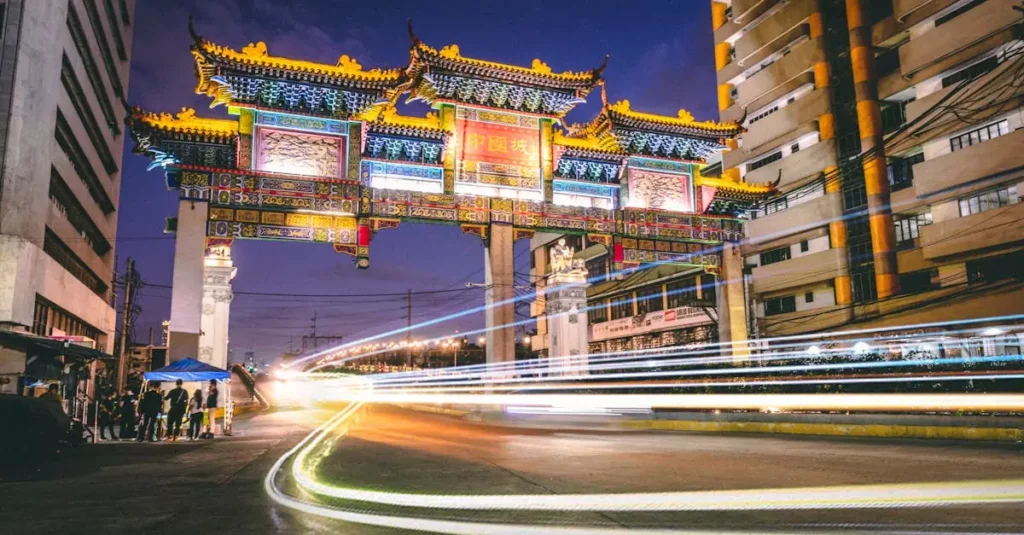

For travelers exploring Manila, staying connected is essential in todays world. Having reliable internet access not only helps with directions and communication but also allows you to share your experiences seamlessly. Knowing the various manila wifi cost tourist options can make your trip much smoother and more enjoyable.
As the vibrant capital of the Philippines, Manila offers multiple ways for visitors to get online. Whether you prefer local SIM cards, eSIMs, pocket Wi-Fi gadgets, or free public hotspots, theres a solution to fit every travelers needs. Each choice brings its own pros and cons, so understanding them will help you select the ideal option based on your budget and travel habits.
Well cover the main internet access methods, typical prices, and handy advice to keep you connected. This includes everything from prepaid SIM cards and digital eSIMs to portable Wi-Fi rentals and complimentary public connections. The goal is to equip you with practical knowledge so that you can decide what works best for you before or right after you arrive.
Understanding Your Options for Manila WiFi Cost Tourist
Once you land in Manila, youll find several main ways to access the internet. Each caters to different preferences and budgets. The most common choices among travelers include local SIM cards, eSIMs, pocket Wi-Fi devices, and public Wi-Fi networks. Your decision often depends on how long youre staying, how much data you need, and how many devices you want to connect. Keeping an eye on the typical manila internet price for each option will help you prepare accordingly.
Local SIM cards remain a favorite for solo visitors or anyone staying several days, thanks to their solid coverage and flexible plans. eSIMs offer a digital twist, ideal for newer phones and those who want to get online immediately upon arrival without swapping physical cards. Portable Wi-Fi devices work well for groups or travelers juggling multiple gadgets. While free public Wi-Fi is widely available, it should be viewed as a backup due to its limitations. Well explore each options costs and key features to guide you through the choices.
Moving around Manila means youll often switch between neighborhoods and attractions. Consistent internet access is crucial for ride-hailing apps, navigation, and quick messaging. Although major city areas generally have strong signals, coverage can fluctuate in less frequented spots. Planning your internet setup ahead of time will save you from frustrating connectivity issues during your trip.
Local SIM Cards: The Go-To for Many Travelers
For many visitors, grabbing a local SIM card is the easiest and most wallet-friendly way to enjoy steady internet service in Manila. The two leading providers are Globe Telecom and Smart Communications, both offering prepaid SIM cards tailored for tourists. You can buy these immediately after landing at Ninoy Aquino International Airport (NAIA), with kiosks conveniently located just past customs. Most people find the whole process quick and hassle-free, usually taking no more than 10 to 15 minutes.
If you miss the airport, local SIM cards are also sold in major malls, convenience stores like 7-Eleven, and official provider outlets. Remember to bring your passport since SIM registration is required by law in the Philippines. The SIM card itself is inexpensive, often ranging between PHP 40 and 100. The bigger expense comes from top-up data bundles, or promos, which offer different combinations of data, calls, and texts valid for specific time frames. For example, a typical tourist data plan might give you 10 to 20 GB of data for 7 to 15 days, usually priced between PHP 300 and 700offering great value for the manila wifi cost tourist.
Activating the SIM is straightforward, with store staff typically ready to assist. Youll usually dial a short code to subscribe to a data package. Tourists often spend around PHP 500 to 1000 for a week or two of ample data. Coverage within Manila and other urban areas tends to be reliable, although speeds may slow during busy periods. Its a good idea to reload your data before it expires to avoid interruptions. This option strikes a practical balance between cost, ease, and network reach for most visitors.
Pros and Cons of Local SIM Cards
- Pros:
- Affordable data options.
- Extensive coverage throughout the Philippines.
- Simple to buy and reload.
- Provides a local phone number for calls and texts.
- Ideal for solo travelers or those using a single device.
- Cons:
- Requires an unlocked phone.
- Inserting a physical SIM means removing your home SIM temporarily.
- SIM registration might take some time.
- Data speeds can fluctuate in crowded areas.
eSIMs: Convenience for the Modern Traveler
eSIMs represent a digital alternative to physical SIM cards, embedded directly within your smartphone. This eliminates the need to physically swap SIMs, making them perfect for travelers with dual SIM phones or those wanting to keep their home number active. Activating an eSIM usually involves scanning a QR code or entering a setup code from the provider. Many services allow you to buy and activate an eSIM before your trip, so you can connect immediately upon arriving in Manila. This pre-planning removes the hassle of hunting for a vendor or waiting in lines at the airport, making it a premium option for many.
International eSIM providers such as Airalo, Nomad, and Holafly offer various data plans tailored for the Philippines. These packages generally include data only, without local phone numbers for calls or texts. Prices fluctuate depending on the data amount and validity periodsay, around $10 to $20 USD for 5 GB valid for 30 days, or $20 to $30 USD for 10 GB during the same timeframe. Although eSIMs may cost a bit more per gigabyte compared to local physical SIMs, their convenience often justifies the price. This makes the manila internet price quite competitive, especially for short trips or those valuing a hassle-free experience.
Before opting for an eSIM, double-check your phones compatibility. Most recent smartphones support eSIM technology, but its wise to confirm beforehand. eSIMs offer smooth connectivity and spare you from handling physical cards. Theyre particularly appealing for short visits where the registration process for physical SIMs may feel tedious. The digital nature of eSIMs matches well with the fast-moving style of many Manila visitors.

Pros and Cons of eSIMs
- Pros:
- No need for a physical SIM card; activation is simple.
- Can be set up before you arrive.
- Keeps your home SIM active for calls and texts.
- More environmentally friendly.
- Great for short stays or specific data needs.
- Cons:
- Only works with eSIM-compatible phones.
- Cost per gigabyte may be higher than physical SIMs.
- Usually data-only; no local phone number included.
- Resolving issues can be trickier without physical support.
Portable WiFi Devices: Group Connectivity
Portable Wi-Fi units, also known as pocket Wi-Fi or MiFi, provide a practical way to connect several devices or share internet access among a group. These compact, battery-powered gadgets create a private Wi-Fi hotspot, allowing multiple smartphones, tablets, laptops, and other Wi-Fi-enabled devices to connect simultaneously. This means only one data plan is needed, simplifying the management of your manila wifi cost tourist for a group. You can often rent these devices at the airport or book them online before your trip.
Daily rental prices for pocket Wi-Fi in Manila generally fall between PHP 300 and 500. Some companies offer discounted weekly or monthly rates. A refundable security deposit, typically PHP 2,000 to 3,000, is required and returned when you hand the device back. Providers like Converge or Smart Bro sometimes have special packages aimed at tourists. Booking ahead is recommended, especially during busy seasons, to ensure availability. Pickup and drop-off points are usually at the airport, making it convenient for most travelers.
The connection speed and coverage for portable Wi-Fi devices usually match that of local SIM cards since they operate on the same networks (Globe or Smart). A single device can support between 5 and 10 connections at once. Battery life is an important factor; most devices last around 6 to 12 hours on a full charge, so carrying a power bank is smart for longer outings. This option works well for families or groups wanting to stay linked without each person purchasing an individual SIM. It offers a centralized way to manage your internet throughout your stay.
Pros and Cons of Portable WiFi Devices
- Pros:
- Supports multiple devices at once.
- Allows internet sharing among travel companions.
- Often includes unlimited or large data plans.
- No need to change SIM cards on your phone.
- Perfect for groups and families.
- Cons:
- Another device to carry and keep charged.
- Rental fees can add up on longer trips.
- Security deposits may be required.
- Battery life might limit usage time.
- If the device fails, the entire group loses internet access.
Free Public WiFi and Hotel Connections
For budget travelers, relying on free public Wi-Fi might seem appealing. Manila has plenty of spots offering complimentary internet, including shopping malls, cafes, restaurants, and fast-food outlets. Many hotels provide free Wi-Fi to guests, often included with your stay. This can help reduce your overall manila wifi cost tourist. Yet, its important to weigh the downsides in terms of speed, reliability, and security. While casual browsing in a cafe might be fine, dont expect stable connections for streaming or large downloads.
Reality Check: Although free Wi-Fi is widespread, its quality in Manila can vary significantly. Crowded hotspots often suffer slow speeds and frequent dropouts, which can be frustrating. Moreover, these networks are usually unsecured, leaving your data vulnerable to hackers. Avoid handling sensitive tasks like online banking on public Wi-Fi. If you must access personal information, always use a Virtual Private Network (VPN) to encrypt your connection and safeguard your privacy.
Hotel Wi-Fi tends to offer better security and faster speeds than generic public hotspots, though it can still be inconsistent, especially in older buildings or during busy periods. Some hotels may charge extra for premium, high-speed internet. For checking emails or light web browsing, free hotel Wi-Fi usually suffices. However, for essential services like navigation, ride-sharing apps, or work, its best not to rely solely on these connections. Treat hotel and public Wi-Fi as complementary rather than your primary internet source in Manila.
Comparing Manila Internet Price Options for Tourists
Picking the right internet option in Manila means balancing cost, ease of use, connection speed, and security. Each choice suits different traveler profiles. The table below lays out the main features of local SIM cards, eSIMs, portable Wi-Fi devices, and free public Wi-Fi, helping you understand their distinctions and manila internet price.
For example, budget-conscious solo travelers often favor local SIM cards, while business travelers needing steady, secure access for multiple gadgets might go for pocket Wi-Fi. Tech-savvy visitors with newer phones will appreciate the convenience of eSIMs. Public Wi-Fi is best reserved for emergencies or light internet tasks. Think about your travel style and length of stay when comparing these options.
| Option | Typical Cost (per week) | Convenience | Speed & Coverage | Security | Best For |
|---|---|---|---|---|---|
| Local SIM Card | PHP 300-700 (~$5-$12 USD) | High (easy purchase and registration) | Reliable in cities | High (private network) | Solo travelers, budget-conscious, longer stays |
| eSIM | $10-$20 USD | Very high (pre-trip setup) | Reliable in urban areas | High (private network) | Tech-savvy visitors, short trips, no SIM swaps |
| Portable WiFi | PHP 2100-3500 (~$35-$60 USD) + deposit | Medium (device pickup and return) | Reliable in cities | High (private network) | Groups, families, multiple devices |
| Free Public WiFi | Free | Variable (depends on hotspots) | Low to medium, inconsistent | Low (unsecured) | Emergency use, light browsing, short periods |
This overview shows that while free internet options exist, they often compromise on reliability and security. Spending a modest amount on a dedicated connection usually improves your travel experience significantly. The manila wifi cost tourist ultimately hinges on whether you prioritize saving money or having dependable, hassle-free connectivity.
Practical Tips for Staying Connected in Manila
Keeping your connection smooth during your Manila visit takes some foresight and smart habits. Here are a few tips to help you get the most out of your internet setup and avoid common issues. Most travelers find that a bit of preparation makes managing their manila wifi cost tourist much easier.
- Download Offline Maps: Before arriving, save offline maps of Manila via apps like Google Maps or Maps.me. This allows you to navigate even if your data runs out or signal weakensa true lifesaver.
- Carry a Power Bank: No matter what internet option you choose, having a portable charger is essential. Constant GPS and data usage drain batteries quickly, and pocket Wi-Fi devices also need recharging.
- Verify Phone Compatibility: Make sure your phone is unlocked and supports the necessary network bands if you plan to use a local SIM or eSIM. While most modern phones work fine, it doesnt hurt to double-check.
- Register Your SIM Card: Philippine law requires SIM card registration with valid ID (passport for tourists). Complete this right after purchase to avoid service disruptions. Airport kiosks can usually assist.
- Use a VPN on Public Wi-Fi: When using free public networks, always employ a Virtual Private Network to encrypt your data and protect your privacy, especially for sensitive activities.
- Monitor Data Usage: Keep track of your remaining data through provider apps or SMS codes to avoid running out unexpectedly.
- Complete eTravel Registration: All travelers entering the Philippines must register via the eTravel system within 72 hours of arrival. Having internet access to complete this early can save you time.
- Have Backup Connectivity: Consider having a primary internet plan plus a fallback, such as a local SIM supplemented by free Wi-Fi spots, to ensure youre never left offline.
Following these suggestions will help you maintain stress-free internet access throughout your Manila stay. Proper preparation means you can navigate, communicate, and share your experiences without worrying about connectivity interruptions.
Frequently Asked Questions About Manila WiFi
How much does a tourist SIM card cost in Manila?
The SIM card itself is inexpensive, usually between PHP 40 and 100. The main expense lies in purchasing data packages, often costing PHP 300 to 700 for one to two weeks of 10 to 20 GB of data. Overall, the manila wifi cost tourist for a SIM card remains very budget-friendly.
Is WiFi widely available in Manila?
Yes, Wi-Fi can be found throughout Manilain malls, cafes, restaurants, and hotels. However, since the quality and security of public networks vary greatly, many travelers prefer personal connections like SIM cards or eSIMs for dependable service.
Can I use an eSIM in the Philippines?
Absolutely. If your phone supports eSIM, international providers like Airalo and Nomad offer data plans for the Philippines. This lets you get online without needing a physical SIM card.
What is the best internet provider for tourists in Manila?
Globe Telecom and Smart Communications are the top choices for most tourists. Both provide solid coverage and competitive prepaid data deals. Your pick may depend on deals available at the airport or the network performance in the areas you plan to visit.
Is free public WiFi safe to use in Manila?
Free public Wi-Fi networks in Manila, as elsewhere, come with security risks. They are often unsecured, which leaves your data exposed. Its best to avoid sensitive transactions on public Wi-Fi and always use a VPN when accessing personal information. Hotel Wi-Fi networks usually offer better security than general public hotspots.
Conclusion: Making Your Manila Connectivity Choice
Deciding how to stay connected in Manila doesnt have to be overwhelming. Several reliable options exist, each suited to different traveler needs. Whether you prioritize affordability, convenience, or multi-device connection, theres a solution for you. Knowing the typical manila wifi cost tourist for each choice helps you pick wisely.
For many solo travelers, purchasing a local SIM card from Globe or Smart strikes the best balance of price and reliability. If your phone supports eSIM and you prefer setting up before arrival, this option offers unmatched convenience. Families or groups find portable Wi-Fi devices handy for shared internet access. While free public Wi-Fi is widely accessible, its safer and more consistent to use it as a backup.
Dont forget to consider factors like device compatibility, data needs, and the importance of carrying a power bank. Staying online will enrich your Manila adventure, allowing you to fully enjoy its dynamic culture and attractions. For broader details about the Philippines, the Philippines Wikipedia page is a helpful resource.

Our Fact Checking Process
We prioritize accuracy and integrity in our content. Here's how we maintain high standards:
- Expert Review: All articles are reviewed by subject matter experts.
- Source Validation: Information is backed by credible, up-to-date sources.
- Transparency: We clearly cite references and disclose potential conflicts.
Our Review Board
Our content is carefully reviewed by experienced professionals to ensure accuracy and relevance.
- Qualified Experts: Each article is assessed by specialists with field-specific knowledge.
- Up-to-date Insights: We incorporate the latest research, trends, and standards.
- Commitment to Quality: Reviewers ensure clarity, correctness, and completeness.
Look for the expert-reviewed label to read content you can trust.